HCL TECHNOLOGIES
Business Experience Designer (XD India)

Steris Kaizen Management
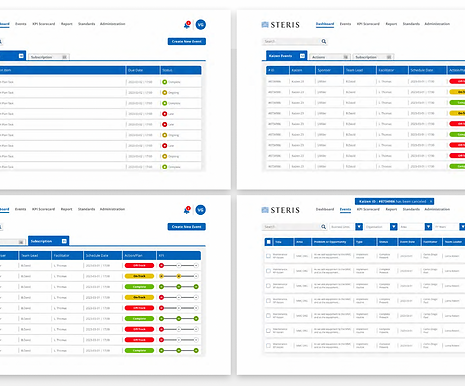
In this project, the software simplifies and enhances event planning, tracking, and reporting. By consolidating all data into one place, it improves visibility and coaching opportunities, reduces administrative work, and enables easy collaboration. With task assignments and notifications, monitoring metrics, and accessing the lean dashboard for results, it offers a comprehensive solution for optimising Event practices.
My Role
As a Team Lead UX strategist and Designer, Effective communication, collaboration, and leadership skills are essential for my role. By fostering a supportive and productive work environment, I help your team members thrive and deliver exceptional user experiences.
Project Duration
3-5 Weeks
1. The Situation: Lean Was Drowning in Admin
Steris wanted to scale Lean and Kaizen practices across growing businesses.
But instead of spending time on:
-
Coaching
-
Training
-
Events
-
Continuous Improvement
Teams were stuck doing:
-
Manual tracking
-
Spreadsheet updates
-
Email follow-ups
-
Disconnected reporting
Event Associates struggled to submit ideas.
Leaders struggled to see engagement.
Admins struggled to manage data.
The system:
-
Was not future-ready
-
Couldn’t integrate new tech easily
-
Had no consistent brand identity
-
Had poor search and navigation
-
Offered no real collaboration
-
Made an engagement tracking manual and painful
The business asked:
“How do we make Lean easier to practice, not harder to manage?”
2. The Design Challenge
The problem wasn’t just building a new tool.
It was enabling cultural change.
The system had to:
-
Reduce admin work
-
Increase visibility
-
Support coaching
-
Enable collaboration
-
Integrate with Microsoft tools
-
Work with Active Directory and non-org users
-
Follow GDPR and accessibility standards
Most importantly:
Lean should live in people’s daily work — not in spreadsheets
3. Starting With People: User Research
We studied:
-
Event Associates
-
Continuous Improvement Reps
-
Lean Steering Committee
-
Business Leaders
-
Frontline Employees
We used:
-
Interviews
-
Shadowing
-
Journey mapping
-
Usability audits
-
System walkthroughs
What We Found:
-
People loved Lean, but hated the admin
-
Submitting ideas felt slow and unclear
-
No one knew where to find past events
-
Reporting was painful
-
Collaboration happened outside the system
-
Engagement was guessed, not measured
One associate said:
“I submit an idea… and then it disappears into silence.
”That became our design north star:
Make improvement visible, connected, and alive.
4. Reframing the Problem
Using Design Thinking, we defined:
Not:
“Build a Kaizen tool".
But:
“How might we help people practice continuous improvement without fighting the system?”
User Persona & Journey | That Shaped the Design

Event Associate
-
Wants to submit ideas easily
-
Needs feedback and visibility
-
Wants to feel heard
Continuous Improvement Rep
-
Coaches teams
-
Prioritizes ideas
-
Tracks momentum
Lean Steering Committee
-
Reviews impact
-
Aligns with business goals
-
Needs clear dashboards
Every feature answered:
-
Does this reduce admin?
-
Does this increase visibility?
-
Does this support coaching?
We audited the old system:
-
No search
-
No navigation logic
-
Inconsistent UI
-
Broken flows
-
Disconnected tools
We created:
-
Journey maps
-
Task flows
-
Mind maps
-
Information architecture
Core structure:
-
Idea submission
-
Event planning
-
Task assignment
-
Communication hub
-
File & link sharing
-
Metrics dashboard
-
Reports for each role
7. Designing for Real Work
UX Principles:
-
Simple standard forms
-
Centralised files & links
-
One collaboration space
-
Task ownership with deadlines
-
Notifications and alerts
-
Search and filter everywhere
-
Role-based dashboards
-
Brand-consistent visuals
-
Accessible by design
We avoided:
-
Hidden actions
-
Overloaded screens
-
Unclear feedback
-
Tech-first thinking
The system followed people’s work — not the other way around.
8. Iteration: Design, Test, Learn, Improve
Round 1 – Lo-Fi Wireframes
Tested:
-
Idea submission
-
Event creation
Navigation flowFeedback:
-
Too many steps
-
Not clear what happens after submit
-
Hard to find past events
We simplified.

Round 2 – Hi-Fi Prototype
Added:
•Clear idea status
•Progress tracking
•Notifications
•Lean dashboard
•Search & filters
•Collaboration panels
Tested with:
•Associates
•CI Reps
•Leaders
Feedback:
•Faster than old system
•Less email needed
•More visibility
•More engagement
One user said:
“Now I can see my idea grow instead of disappear.”
9. From Tool to Culture Enabler
The new Steris Kaizen Management system:
-
Centralized all data
-
Reduced admin work
-
Made ideas visible
-
Enabled coaching
-
Encouraged collaboration
-
Supported Microsoft ecosystem
-
Worked with Org and non-Org users
-
Followed GDPR and accessibility
Lean moved from “extra work” to “everyday work.”
10. Business Impact
The design delivered:
-
75% less time searching for info
-
80% better findability with search & filters
-
20% improvement in accessibility
-
85% productivity gain with MS tools integration
-
81% higher profitability with strong engagement
-
Higher usage, clicks, and satisfaction
Teams didn’t just use the system — they trusted it.
11. Validation as a Continuous Loop
-
Prototype shared by email
-
Sandbox for safe testing
-
Feedback from multiple roles
-
Iterative improvements
-
Regular demos
Design never “finished.”It evolved with Lean itself.
12. Final Reflection
This project wasn’t about software.
It was about behaviour.
We didn’t force people to “do Lean".
We removed the friction that stopped them.
By combining:
-
User Research
-
Design Thinking
-
Iteration
-
Validation
We transformed Kaizen from an admin burden into a living system of improvement.
Good design didn’t teach Lean.
It made Lean easy to practice.
Conclusions
When it comes to designing for various user groups, there are specific challenges that must be addressed. However, with the right tools and strategies, creating an optimal experience for everyone involved is possible. One of the most significant aspects of this process is implementing user-friendly forms that are easy to navigate and complete. Additionally, establishing file/Link-sharing sections can be incredibly useful, allowing team members to access the necessary information and collaborate on projects (Org Events) more efficiently. Another key component is integrating communication hubs, which can significantly streamline the improvement process and ensure that everyone is on the same page.